




TABLE OF CONTENTS
Serverless vs Containers: Choosing the Right Compute Model for Your Workload

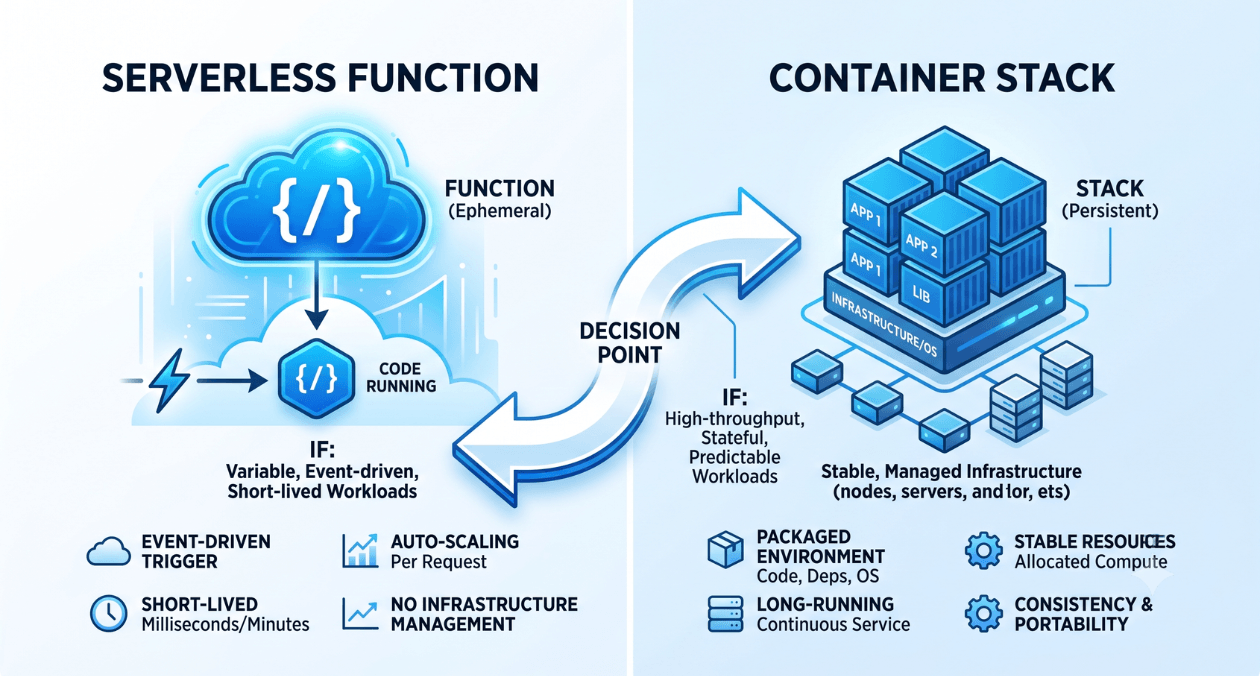
Every engineering team building on the cloud eventually runs into this question: should this workload run on serverless functions or inside containers. The answer used to be simpler when serverless meant tiny event handlers and containers meant everything else. In 2026 that line has blurred, with platforms offering serverless containers, container based functions, and orchestration layers that borrow ideas from both worlds. For architects and CTOs, the real cost of getting this decision wrong is not the compute bill, it is the months spent re-platforming a workload that was never suited to its original home. The team at Askan Technologies works with engineering leaders through exactly this kind of decision as part of our cloud and DevOps engineering work, and the pattern we see most often is teams choosing based on hype rather than workload shape.
What Serverless Computing Actually Means
Serverless computing hands the entire question of servers, scaling, and idle capacity to the cloud provider. You write a function, attach it to a trigger such as an API call, a queue message, or a scheduled event, and the platform runs it only when needed. AWS Lambda, Azure Functions, and Google Cloud Functions all follow this pattern, executing your code for milliseconds or seconds at a time and billing per invocation and per unit of compute time. Nothing runs between invocations, so there is no server sitting idle for a workload that only fires twice a day. That is the entire appeal of serverless, it removes capacity planning for spiky, unpredictable, or infrequent workloads. The tradeoff is that each invocation is stateless and short lived by design, so serverless does not suit long running processes, workloads with heavy in memory state, or anything that needs to keep a connection open for more than a few minutes.
What Containers Bring to the Table
Containers package an application with its dependencies into a single portable unit that runs consistently across environments. Kubernetes, ECS, and similar orchestrators then manage how many container instances run, where they run, and how traffic is routed to them. Unlike serverless functions, containers keep running continuously, which means they hold state in memory, maintain long lived connections, and respond instantly because there is no cold start. This makes them the natural fit for APIs under constant traffic, background workers that process a steady stream of jobs, and any service where predictable, low latency response time matters more than cost efficiency at low volume. Our web development teams at Askan build a fair share of containerised backends for clients who outgrew a serverless prototype once traffic became continuous rather than spiky, and the migration usually comes down to one signal: the Lambda bill for constant, high volume traffic starting to cost more than a modest, right sized container fleet running around the clock.
| Factor | Serverless | Containers |
| Best for | Spiky, event driven workloads | Continuous, predictable traffic |
| Scaling | Automatic, per request | Manual or autoscaled by rules |
| Cold start | Present, adds latency | None, always warm |
| Billing | Pay per invocation | Pay for allocated capacity |
| State | Stateless by design | Can hold in memory state |
Cold Starts, Latency, and Why They Matter
Cold starts are the most misunderstood part of the serverless conversation. When a function has not run recently, the platform needs to provision a new execution environment before your code runs, and that provisioning step adds latency, sometimes a few hundred milliseconds, sometimes several seconds for functions with large dependencies or those running inside a VPC. For a background job that processes a queue every few minutes, a cold start is irrelevant. For a customer facing API where every millisecond affects conversion, it can be a real problem. Provisioned concurrency and warm up pings reduce this but add back some of the cost and complexity that serverless was meant to remove. Containers avoid the problem entirely because the process is already running and simply waiting for the next request, which is exactly why high traffic, latency sensitive services tend to stay containerised even as serverless options for containers have matured.
Plan Your Compute Strategy
Cost Modelling: Pay per Execution vs Reserved Capacity
Serverless pricing rewards unpredictability and low average utilisation. AWS Lambda, for instance, bills per request and per gigabyte second of compute time, with tiered discounts kicking in only at very high monthly volume, a structure AWS documented when it introduced tiered Lambda pricing. That means a function that runs rarely can cost fractions of a cent a month, but a function that runs constantly at scale can end up costing more than an equivalent container, because you are paying a premium for the convenience of not managing servers. Containers flip this. You pay for the compute capacity you reserve, whether or not it is fully used, which means idle containers waste money but heavily used ones become cheaper per unit of work as utilisation climbs. The practical exercise most teams skip is modelling both cost curves against actual or projected traffic patterns before committing. A workload with a predictable daily traffic shape will usually cost less on containers, while a workload that fires occasionally and unpredictably will usually cost less on serverless, right up until the point that volume grows.
When Serverless Makes Sense
Serverless earns its keep on workloads with genuinely variable load: webhook handlers, image processing triggered by uploads, scheduled batch jobs that run once a day, glue code between other services, and early stage products where traffic is unknown and infrastructure overhead needs to stay near zero. It also suits teams that want to avoid operating an orchestration layer at all, since there is no cluster to patch, scale, or secure. If your team is small, your workload is bursty, and you would rather pay slightly more per unit of compute in exchange for zero operational overhead, serverless is usually the right starting point, and it is far easier to move from serverless into containers once a workload’s traffic pattern becomes clear than to guess wrong in the other direction.
When Containers Are the Better Fit
Containers make more sense once a service has continuous, predictable traffic, needs consistently low response times without exception, or depends on long lived connections such as WebSockets or persistent database pools. They are also the better choice when a workload needs fine grained control over runtime, memory, and networking, or when an organisation already runs Kubernetes for other services and the marginal cost of adding one more deployment is low. Teams running multiple microservices at meaningful scale generally converge on containers because the orchestration investment, once made, pays off across every service rather than being duplicated per function.
| Workload Type | Recommended Model |
| Scheduled batch jobs | Serverless |
| Public API with steady traffic | Containers |
| Webhook or event processing | Serverless |
| Real time chat or WebSocket service | Containers |
| Early stage product, unknown load | Serverless |
| Multi service backend at scale | Containers |
Hybrid Architectures: Using Both Together
Most mature platforms in 2026 do not pick one model exclusively. It is common to see an API gateway routing steady, high volume traffic to a containerised backend running on Kubernetes, while asynchronous, bursty work such as email sending, report generation, and third party webhook processing runs on serverless functions behind the same system. This hybrid approach lets teams optimise each part of the architecture for its actual traffic shape instead of forcing every service into one model. Headless commerce platforms are a good example of where this shows up in practice. A storefront’s checkout API benefits from the predictable, low latency profile of containers, while the notification and inventory sync jobs that fire around each order are a natural fit for serverless. We see this pattern often in Medusa.js commerce builds, where the core storefront stays containerised and peripheral workflows move to serverless without adding operational weight to the main platform.
Operational Overhead: What Your Team Actually Has to Manage
Compute cost is only half the equation, the other half is the engineering time a model demands week to week. Serverless removes patching, scaling policies, and cluster upgrades entirely, which is a genuine saving for a small team that would otherwise need someone dedicated to cluster health. Containers demand ongoing attention: node upgrades, security patching of base images, autoscaling tuning, and monitoring the orchestration layer itself, none of which shows up on a cloud bill but all of which shows up in engineering hours. A team of three or four backend engineers can usually absorb serverless operations alongside feature work, while a meaningful container footprint tends to need at least a part time platform role once it grows past a handful of services. This is worth weighing honestly during the decision, since a cheaper compute bill on containers can be offset entirely by the salary cost of the person needed to keep that cluster healthy, particularly for smaller engineering teams that do not yet have dedicated platform capacity.
There is no permanent right answer here, only a right answer for the workload in front of you at its current traffic profile, and that answer is allowed to change as the product grows. Teams that treat this as a one time architectural decision tend to regret it either way, ending up with over-engineered container clusters for workloads that barely run, or serverless functions straining under constant load they were never designed for. The healthier approach is to profile the workload honestly, model both cost curves against real traffic, and revisit the decision every time the traffic pattern shifts meaningfully rather than defaulting to whatever the last project used.
Plan Your Compute Strategy
Most popular pages
-

Image Optimization for Web Performance: Formats and Compression
Ask a developer why a page feels slow, and the honest answer is often sitting right in the middle of it. A single unoptimised...
-

Monolith vs Microservices: Choosing the Right Architecture for Your Team
Microservices have dominated architecture conversations for years, to the point where choosing a monolith can feel like admitting you're behind the times. In practice,...
-

Magento Performance Tuning: Caching Layers Explained
Magento has a reputation for being resource-heavy, and while some of that is inherent to running a full-featured enterprise commerce platform, a large share...
Image Optimization for Web Performance: Formats and Compression
Ask a developer why a page feels slow, and the honest answer is often sitting right in the middle of it. A single unoptimised...
Monolith vs Microservices: Choosing the Right Architecture for Your Team
Microservices have dominated architecture conversations for years, to the point where choosing a monolith can feel like admitting you're behind the times. In practice,...
Magento Performance Tuning: Caching Layers Explained
Magento has a reputation for being resource-heavy, and while some of that is inherent to running a full-featured enterprise commerce platform, a large share...