




TABLE OF CONTENTS
WordPress vs Headless WordPress: When Decoupling Actually Makes Sense

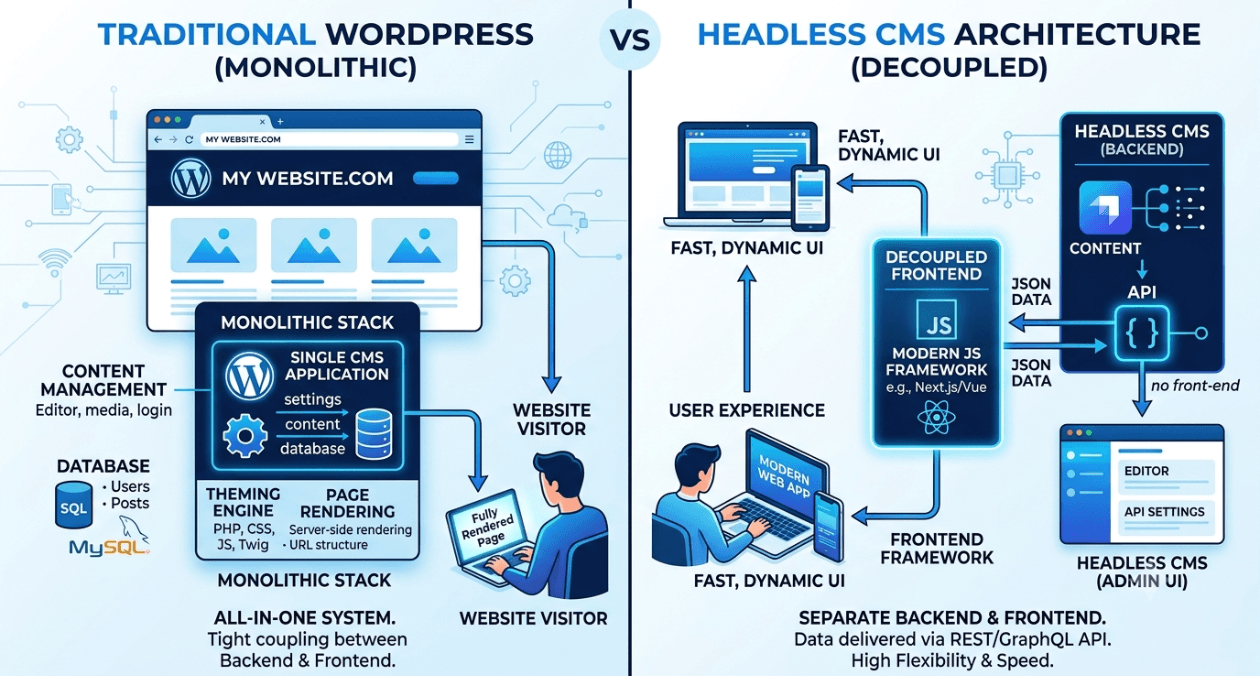
WordPress still runs a massive share of the web, and for good reason. It is fast to launch, familiar to content teams, and backed by a plugin ecosystem that covers almost any business need. But as more engineering teams push for faster frontends, multi channel publishing, and tighter control over user experience, a different question keeps showing up in planning meetings: should we decouple the frontend from WordPress and go headless.
This is not a decision to make because it sounds modern. Decoupling adds real engineering overhead, and for a large share of sites the classic WordPress setup already does the job well. This guide breaks down what headless WordPress actually changes under the hood, when the tradeoff genuinely pays off, and when it does not. If your team is weighing this for an upcoming rebuild, our WordPress development team can walk through the specifics with you before you commit engineering time to either path.
What Headless WordPress Actually Means
In a traditional WordPress setup, one system handles content storage, the admin dashboard, and the frontend that visitors see, all stitched together through themes and PHP templates. Headless WordPress keeps WordPress purely as the backend, the place where editors write and manage content, while a separate frontend framework, commonly Next.js, Astro, or something similar, pulls that content through the WordPress REST API or a GraphQL layer and renders it independently.
The word headless refers to removing the head, meaning the theme and templating layer, and letting a dedicated frontend own presentation instead. WordPress becomes a content source rather than a full website engine. Editors still log in and write posts the same way they always have, but what happens to that content after it is saved changes completely.
Traditional WordPress vs Headless WordPress
| Aspect | Traditional WordPress | Headless WordPress |
|---|---|---|
| Frontend rendering | PHP templates and themes render every page | A separate framework such as Next.js renders pages |
| Editor experience | WYSIWYG editing tied directly to the live theme | Editors work in WP admin, live preview needs extra setup |
| Performance ceiling | Limited by PHP execution and plugin bloat | Can be statically generated or edge rendered for speed |
| Plugin compatibility | Full compatibility, plugins work as intended | Forms, page builders and SEO plugins often need rework |
| Best fit | Content sites, blogs, small business sites | Multi channel publishing, high traffic custom frontends |
When Decoupling Actually Makes Sense
The strongest case for headless WordPress shows up when the same content needs to reach more than one surface, for example a marketing website, a mobile app, and a kiosk or partner integration, all pulling from a single editorial workflow. It also makes sense when an engineering team already builds in React or Next.js and wants full ownership of frontend performance rather than working around a theme.
Marketing teams that run frequent campaign pages or A/B tests often push for this too, since a decoupled frontend can ship changes on its own release cycle without waiting on a WordPress deploy. And if Core Web Vitals are a hard business requirement, for example an ecommerce brand where load time directly affects conversion, a statically generated or edge rendered frontend can outperform a traditional theme by a wide margin once traffic scales.
When It Is Not Worth The Extra Complexity
For a large number of projects, going headless solves a problem the team does not actually have. Small business or brochure sites where the content team just needs an easy visual editor rarely benefit, since the whole point of WordPress there is letting non technical staff manage pages without engineering involvement.
Budget constrained projects run into a similar wall. Headless setups effectively require two skill sets on staff or on retainer, someone who understands WordPress as a backend and someone who can build and maintain a separate frontend application. If a site leans heavily on the plugin ecosystem, things like WooCommerce extensions, page builders, or forms with complex conditional logic, a lot of that functionality either breaks in a headless setup or has to be rebuilt from scratch as custom API calls.
What Breaks and What You Need To Plan For
A few specific pain points come up in almost every headless WordPress migration. SEO plugins like Yoast generate meta tags and schema markup tied to the theme rendering the page, so in a headless setup that data has to be fetched separately through the API and injected into the frontend manually. Live preview for editors stops working out of the box, since there is no theme rendering the draft version of a post, which means building a custom preview mode.
Contact forms and interactive plugins built for Elementor or Gravity Forms usually need to be rebuilt as API calls handled by the new frontend. Caching strategy shifts too, moving away from page caching plugins toward CDN level caching or static regeneration, which is a different mental model for a team used to managing WordPress caching plugins.
A Quick Way To Decide
| Go Headless If | Stay With Traditional WordPress If |
|---|---|
| You already publish to multiple frontends from one content source | The site is primarily a blog or brochure site with standard needs |
| Frontend performance and architecture control matter more than plugin convenience | Your content team relies heavily on visual page builders |
| You have dedicated frontend engineering resource long term | Budget and timeline cannot support two separate codebases |
Decoupling WordPress is not an upgrade, it is a tradeoff. It buys speed and architectural flexibility on the frontend at the cost of losing a lot of the convenience that made WordPress popular in the first place. The right call depends on how your content team actually publishes today and how much frontend engineering capacity you can commit to for the long run, not on what the rest of the industry is doing this year.
Teams that get this decision wrong usually made it for the wrong reason, chasing a trend rather than solving an actual bottleneck in publishing speed or performance. If you are evaluating a decoupled build for an upcoming project, our CMS development team can help assess whether the tradeoff is worth it for your specific traffic pattern and editorial workflow.
Most popular pages
-

Image Optimization for Web Performance: Formats and Compression
Ask a developer why a page feels slow, and the honest answer is often sitting right in the middle of it. A single unoptimised...
-

Monolith vs Microservices: Choosing the Right Architecture for Your Team
Microservices have dominated architecture conversations for years, to the point where choosing a monolith can feel like admitting you're behind the times. In practice,...
-

Magento Performance Tuning: Caching Layers Explained
Magento has a reputation for being resource-heavy, and while some of that is inherent to running a full-featured enterprise commerce platform, a large share...
Image Optimization for Web Performance: Formats and Compression
Ask a developer why a page feels slow, and the honest answer is often sitting right in the middle of it. A single unoptimised...
Monolith vs Microservices: Choosing the Right Architecture for Your Team
Microservices have dominated architecture conversations for years, to the point where choosing a monolith can feel like admitting you're behind the times. In practice,...
Magento Performance Tuning: Caching Layers Explained
Magento has a reputation for being resource-heavy, and while some of that is inherent to running a full-featured enterprise commerce platform, a large share...