




TABLE OF CONTENTS
Serverless vs Containers vs VMs: Choosing the Right Compute Model for Your Application

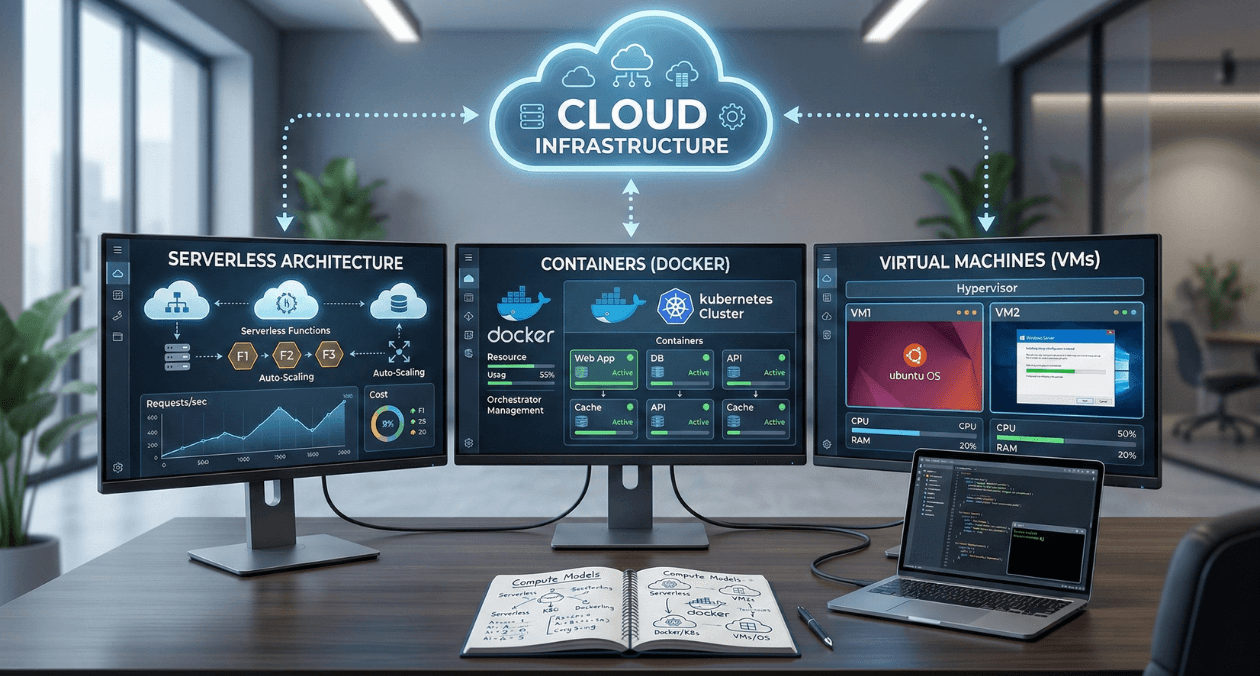
The compute model you choose affects everything: development velocity, operational complexity, scalability characteristics, and ultimately, your cloud bill. Pick wrong, and you’re either over-engineering simple applications or under-engineering complex ones.
In 2026, enterprises have three primary compute options: traditional virtual machines (VMs), containerized applications running on Kubernetes or similar orchestrators, and serverless functions running on platforms like AWS Lambda, Azure Functions, or Google Cloud Functions.
Each model promises different benefits. VMs offer maximum control and flexibility. Containers provide consistency and efficient resource usage. Serverless eliminates infrastructure management entirely. But these promises come with trade-offs that aren’t obvious until you’re in production.
For solution architects and technical leads making compute decisions in 2026, the question isn’t which model is “best.” It’s which model fits your application’s characteristics, team capabilities, and organizational constraints.
At Askan Technologies, we’ve architected and deployed applications across all three compute models for 55+ clients over the past 24 months, building everything from simple APIs to complex distributed systems serving users across US, UK, Australia, and Canada.
The data from these implementations reveals clear patterns: the right compute model can reduce infrastructure costs 40-70% and improve development velocity 30-50%. The wrong model doubles operational overhead while delivering no performance benefits.
The Three Compute Models Explained
Before comparing models, let’s establish what each actually provides.
Virtual Machines: The Traditional Model
What they are:
- Software emulation of physical computers
- Run complete operating systems (Linux, Windows)
- Full control over OS, networking, storage
- Long-lived (run continuously, weeks to months)
Popular platforms:
- AWS EC2
- Azure Virtual Machines
- Google Compute Engine
- DigitalOcean Droplets
Typical use case: Traditional web application
- VM runs 24/7
- Nginx web server + Node.js application
- PostgreSQL database on separate VM
- You manage OS updates, security patches, monitoring
Cost model: Pay per hour for running instances (whether you use them or not)
Containers: The Consistency Model
What they are:
- Lightweight, portable application packages
- Include application code + dependencies
- Share host OS kernel (more efficient than VMs)
- Can be orchestrated (Kubernetes) or serverless (AWS Fargate, Cloud Run)
Popular platforms:
- Kubernetes (EKS, AKS, GKE)
- AWS Fargate
- Google Cloud Run
- Azure Container Instances
Typical use case: Microservices application
- Multiple containers (API service, worker service, frontend)
- Kubernetes orchestrates deployment, scaling, networking
- Containers start in seconds, can scale rapidly
- You manage container images, orchestration config
Cost model: Pay for compute resources containers consume (CPU, memory)
Serverless: The Zero-Management Model
What they are:
- Functions that run in response to events
- Fully managed by cloud provider
- Auto-scale from zero to thousands of instances
- Billed per execution (millisecond granularity)
Popular platforms:
- AWS Lambda
- Azure Functions
- Google Cloud Functions
- Cloudflare Workers
Typical use case: API endpoint
- Function triggered by HTTP request
- Executes business logic
- Returns response
- Provider handles all infrastructure, scaling, availability
Cost model: Pay per request + execution time (only pay when code runs)
The Cost Comparison
Cost differences between models can be dramatic depending on usage patterns.
Scenario 1: Low-Traffic API (10,000 requests/month)
Application: Simple REST API, average 200ms execution time
Virtual Machine:
- Single t3.small instance (2 vCPU, 2GB RAM)
- Running 24/7: 720 hours/month
- Cost: $15/month
- Utilization: ~1% (idle 99% of time)
- Effective cost per request: $0.0015
Container (Cloud Run / Fargate):
- Allocated resources: 1 vCPU, 2GB RAM
- Running only during requests: ~33 minutes/month
- Cost: $2-$4/month (depending on platform)
- Utilization: 100% (only runs when needed)
- Effective cost per request: $0.0002-$0.0004
Serverless (Lambda):
- 128MB memory allocation
- 10,000 invocations × 200ms = 2,000 seconds
- Cost: Free tier (1M requests free, 400K GB-seconds free)
- Beyond free tier: ~$0.20/month
- Effective cost per request: $0.00002 (or free)
Winner for low traffic: Serverless (90-99% cheaper than VMs)
Scenario 2: Medium-Traffic Application (10M requests/month)
Application: Web API with database, average 150ms response time
Virtual Machine:
- 3× m5.large instances (load balanced)
- Running 24/7
- Cost: $216/month (compute) + $25/month (load balancer) = $241/month
- Cost per request: $0.0000241
Container (Kubernetes on EKS/GKE):
- 5 pods average, autoscaling 3-10 pods
- 2× c5.xlarge worker nodes
- Cost: $146/month (nodes) + $73/month (control plane) = $219/month
- Cost per request: $0.0000219
Serverless (Lambda):
- 10M requests × 150ms × 512MB memory
- Cost: $93/month (requests) + $146/month (compute time) = $239/month
- Cost per request: $0.0000239
Winner for medium traffic: Containers (marginally cheaper, better performance)
Scenario 3: High-Traffic Application (1B requests/month)
Application: High-performance API, 50ms average response time
Virtual Machine:
- 20× c5.2xlarge instances (autoscaling 15-25)
- Cost: $5,760/month (compute) + $25/month (load balancer) = $5,785/month
- Cost per request: $0.0000058
Container (Kubernetes):
- 100 pods average (autoscaling 80-150)
- 15× c5.4xlarge worker nodes
- Cost: $5,292/month (nodes) + $73/month (control plane) = $5,365/month
- Cost per request: $0.0000054
Serverless (Lambda):
- 1B requests × 50ms × 256MB memory
- Cost: $400/month (requests) + $2,917/month (compute) = $3,317/month
- Cost per request: $0.0000033
Winner for high traffic: Serverless (still 40% cheaper at massive scale)
Key insight: Serverless pricing scales better than expected. At high volumes, Lambda is often cheapest option.
The Performance Comparison
Cost isn’t everything. Performance characteristics differ dramatically.
Cold Start Latency
Cold start: Time to start serving first request after idle period
| Model | Cold Start Time | When It Occurs |
| VM | 30-90 seconds | Initial boot only |
| Container | 2-10 seconds | Pod scaling events |
| Serverless | 50ms-3 seconds | First request after idle (5-15 min) |
Impact by application type:
User-facing web application:
- Cold starts visible to users
- VM best (always warm)
- Containers acceptable (2-10s during scale-up)
- Serverless problematic (50ms-3s delay for users)
Background job processing:
- Cold starts irrelevant (users don’t wait)
- All models acceptable
API with predictable traffic:
- Provision minimum capacity (warm instances)
- All models work well
API with sporadic traffic:
- VM wasteful (idle most of time)
- Serverless ideal (scale to zero between requests)
Execution Performance
Compute-intensive tasks (image processing, video encoding):
| Model | Performance |
| VM | Best (no virtualization overhead, dedicated resources) |
| Container | Good (minimal overhead vs VM) |
| Serverless | Limited (restricted CPU, 15-minute max execution) |
I/O-intensive tasks (database queries, API calls):
| Model | Performance |
| VM | Good (persistent connections to databases) |
| Container | Good (similar to VM) |
| Serverless | Acceptable (connection overhead for each invocation) |
Memory-intensive workloads (in-memory caching, large datasets):
| Model | Memory Limit |
| VM | Up to 768GB per instance (AWS u-7i24tb.224xlarge) |
| Container | Up to 240GB per pod (Kubernetes limits) |
| Serverless | Up to 10GB (Lambda max) |
Verdict: VMs and containers suitable for any workload. Serverless has hard limits.
Scalability Characteristics
Scaling speed:
| Model | Scale Up Time | Scale Down Time |
| VM | 2-5 minutes | 1-2 minutes |
| Container | 30-60 seconds | Immediate |
| Serverless | Milliseconds | Immediate |
Maximum scale:
| Model | Practical Limit | Constraint |
| VM | 1,000s instances | Account quotas, startup time |
| Container | 10,000s pods | Cluster capacity |
| Serverless | Unlimited (100Ks) | Provider handles all scaling |
Cost of idle capacity:
| Model | Idle Cost |
| VM | 100% (pay even if idle) |
| Container | 100% (pay for provisioned capacity) |
| Serverless | 0% (no charges when not executing) |
The Operational Comparison
Day-to-day management effort varies dramatically.
What You Manage
Virtual Machines:
- Operating system updates and security patches
- Runtime environment (Node.js, Python versions)
- Application deployment and configuration
- Monitoring and logging setup
- Scaling rules and load balancing
- Networking and firewall rules
- Backup and disaster recovery
Containers:
- Container images (build and updates)
- Orchestration configuration (Kubernetes manifests)
- Application deployment
- Monitoring and logging (cluster-level)
- Cluster management (if self-managed K8s)
- OS patches (managed by platform)
Serverless:
- Function code
- Function configuration (memory, timeout)
- Infrastructure (provider managed)
- Scaling (automatic)
- OS patches (provider managed)
DevOps Team Requirements
To manage $1M annual infrastructure spend:
Virtual Machines:
- 2-3 DevOps engineers
- Skills: Linux admin, networking, monitoring, scripting
- Annual labor cost: $300K-$450K
Containers (managed Kubernetes):
- 1.5-2 DevOps engineers
- Skills: Kubernetes, containers, YAML, monitoring
- Annual labor cost: $225K-$300K
Serverless:
- 0.5-1 DevOps engineer
- Skills: Cloud platform, IAM, monitoring
- Annual labor cost: $75K-$150K
Total cost including labor:
| Model | Infrastructure | Labor | Total |
| VMs | $1M | $375K | $1.375M |
| Containers | $900K | $262K | $1.162M |
| Serverless | $850K | $112K | $962K |
Serverless wins on total cost (infrastructure + labor) for most workloads.
Deployment Complexity
Virtual Machine deployment:
- Provision VM
- Configure OS and security
- Install runtime dependencies
- Deploy application code
- Configure reverse proxy (Nginx)
- Set up monitoring
- Configure auto-scaling group
Time: 2-4 hours for experienced engineer
Container deployment (Kubernetes):
- Build Docker image
- Push to container registry
- Apply Kubernetes manifests
- Verify deployment
Time: 15-30 minutes after initial cluster setup
Serverless deployment:
- Write function code
- Configure function (memory, timeout)
- Deploy via CLI or console
Time: 5-10 minutes
Verdict: Serverless fastest deployment, containers middle ground, VMs slowest.
Real-World Decision Matrix
When to Choose Virtual Machines
- Long-running processes (websocket servers, streaming applications)
- Complex dependencies (specific OS requirements, custom kernel modules)
- High-performance computing (dedicated CPU, GPU workloads)
- Legacy applications (not containerized, complex to refactor)
- Full control required (custom network configuration, kernel tuning)
- Persistent local storage needed (large local caches, temporary files)
Example use cases:
- Game servers (long-lived connections)
- Machine learning training (GPU instances, hours-long jobs)
- Legacy monoliths (complex to modernize)
- Database servers (persistent storage, consistent performance)
When to Choose Containers
- Microservices architecture (many small services, complex interactions)
- Consistent environment needed (development, staging, production parity)
- Medium-to-high traffic (consistent load, not highly variable)
- Portability required (multi-cloud, hybrid cloud strategies)
- Team has container expertise (Kubernetes knowledge available)
- Moderate complexity acceptable (willing to manage orchestration)
Example use cases:
- Multi-service web applications (frontend, backend, workers, jobs)
- Microservices platforms (10-100 services)
- Batch processing pipelines (data transformation, ETL)
- Development environments (consistent local + production)
When to Choose Serverless
- Variable/unpredictable traffic (spiky load, long idle periods)
- Event-driven workloads (responding to file uploads, database changes, queues)
- Low-to-medium complexity (stateless, short-lived executions)
- Fast iteration priority (rapid development and deployment)
- Minimal ops team (small team, limited DevOps expertise)
- Cost optimization critical (pay-per-use model beneficial)
Example use cases:
- API backends (especially CRUD operations)
- Image/video processing (triggered by uploads)
- Scheduled tasks (cron jobs, periodic data sync)
- Webhooks (responding to third-party events)
- IoT data ingestion (variable message rates)
Real Implementation: Multi-Tier Application
Company Profile
Industry: E-learning platform
Scale: 250,000 students, 2,000 courses
Architecture: Web frontend, API backend, video processing, notification system
Previous architecture (all VMs):
- 15× web server VMs
- 10× API server VMs
- 5× background job VMs
- 3× video processing VMs (GPU instances)
- Monthly cost: $18,400
- DevOps team: 2.5 engineers
Optimized Multi-Model Architecture
After analysis, we implemented hybrid approach using different compute models per workload:
Component 1: Web Frontend
- Model chosen: Containers (Cloud Run / App Runner)
- Rationale: Moderate traffic, needs to scale quickly during course launches
- Configuration: 3-20 container instances, autoscaling on CPU
- Cost: $1,200/month (was $5,400 on VMs)
- Savings: 78%
Component 2: API Backend
- Model chosen: Containers (Kubernetes on GKE)
- Rationale: Consistent traffic, complex service mesh, persistent connections
- Configuration: 5-15 pods, HPA on request rate
- Cost: $3,200/month (was $3,600 on VMs)
- Savings: 11%
Component 3: Video Processing
- Model chosen: Virtual Machines (GPU instances)
- Rationale: GPU required, long-running jobs (1-3 hours), high compute intensity
- Configuration: 2× g4dn.2xlarge on-demand + 3× spot instances
- Cost: $2,100/month (was $4,500 on always-on VMs)
- Savings: 53% (spot instances + only run when jobs exist)
Component 4: Notification System
- Model chosen: Serverless (Lambda + SQS)
- Rationale: Event-driven, highly variable (100-10,000 notifications/hour), simple logic
- Configuration: Lambda triggered by SQS messages
- Cost: $180/month (was $1,800 on VMs)
- Savings: 90%
Component 5: Scheduled Tasks (Reports, Data Sync)
- Model chosen: Serverless (Lambda + EventBridge)
- Rationale: Run hourly or daily, short execution, no state
- Configuration: 15 different Lambda functions on schedules
- Cost: $45/month (was $900 on dedicated VMs)
- Savings: 95%
Results After 4 Months
Cost comparison:
| Component | Before (VMs) | After (Hybrid) | Savings |
| Web frontend | $5,400 | $1,200 | 78% |
| API backend | $3,600 | $3,200 | 11% |
| Video processing | $4,500 | $2,100 | 53% |
| Notifications | $1,800 | $180 | 90% |
| Scheduled tasks | $900 | $45 | 95% |
| Load balancers | $1,200 | $600 | 50% |
| Monitoring | $1,000 | $400 | 60% |
| Total | $18,400 | $7,725 | 58% |
Annual savings: $128,100
Performance improvements:
- Web frontend response time: 240ms → 180ms (25% faster)
- Video processing queue time: 15 min → 3 min (80% faster with spot instances)
- Notification delivery: 30 seconds → 2 seconds (93% faster)
Operational improvements:
- Deployment frequency: 2×/week → 10×/week (serverless enables rapid iteration)
- DevOps team: 2.5 engineers → 1.5 engineers (lower operational overhead)
- Incident recovery time: 45 minutes → 12 minutes (auto-scaling handles load spikes)
ROI calculation:
- Infrastructure savings: $128K/year
- Labor savings: 1 engineer × $150K = $150K/year
- Migration cost: $65K (8 weeks, 2 engineers)
- Payback period: 4 months
The Hybrid Strategy
Most successful architectures use multiple compute models strategically.
Decision Tree for Each Component
Question 1: Is it event-driven with variable traffic?
- Yes → Consider serverless
- No → Continue to Question 2
Question 2: Does it need GPUs or high sustained CPU?
- Yes → Use VMs (especially with spot instances)
- No → Continue to Question 3
Question 3: Is it part of complex microservices architecture?
- Yes → Use containers (orchestration benefits)
- No → Continue to Question 4
Question 4: Does it run continuously with predictable load?
- Yes → Use containers or VMs (better cost than serverless)
- No → Use serverless
Common Hybrid Patterns
Pattern 1: Serverless for edges, containers for core
- API Gateway + Lambda: Handle HTTP requests, route to services
- Kubernetes backend: Run complex business logic
- Benefits: Fast iteration on APIs, stable core services
Pattern 2: Containers for apps, VMs for databases
- Containerized application tier: Easy deployment, scaling
- VM database tier: Consistent performance, persistent storage
- Benefits: Operational simplicity, performance where it matters
Pattern 3: Serverless for data processing, containers for serving
- Lambda data pipelines: Process uploads, transform data
- Container API: Serve processed data to users
- Benefits: Cost-effective processing, reliable serving
Migration Strategies
From VMs to Containers
Timeline: 6-12 weeks for medium application
Step 1: Containerize applications (Weeks 1-4)
- Create Dockerfiles for each service
- Test containers locally
- Push to container registry
Step 2: Set up orchestration (Weeks 5-6)
- Provision Kubernetes cluster (or use managed service)
- Create deployment manifests
- Configure networking, ingress, secrets
Step 3: Gradual migration (Weeks 7-10)
- Deploy containers alongside VMs
- Shift 10% traffic to containers
- Monitor performance, costs, errors
- Gradually increase to 100%
Step 4: Decommission VMs (Weeks 11-12)
- Verify all traffic on containers
- Remove VM infrastructure
- Update monitoring and alerting
Typical cost: $40K-$80K in engineering time
Typical savings: 15-35% infrastructure costs ongoing
From Containers to Serverless
Timeline: 4-8 weeks for suitable workloads
Step 1: Identify candidates (Week 1)
- Event-driven services (webhooks, processors)
- Low-traffic APIs (under 10M requests/month)
- Simple stateless functions
Step 2: Refactor for serverless (Weeks 2-4)
- Extract handler functions
- Remove state dependencies
- Configure event triggers
Step 3: Parallel deployment (Weeks 5-6)
- Deploy serverless versions
- Route small percentage of traffic
- Compare performance and costs
Step 4: Complete migration (Weeks 7-8)
- Shift 100% traffic to serverless
- Remove container deployments
Typical cost: $20K-$40K engineering
Typical savings: 40-70% for suitable workloads
Common Mistakes
Mistake 1: Choosing Based on Hype, Not Requirements
Problem: “Serverless is the future, let’s migrate everything”
Result: Long-running websocket application on Lambda hits 15-minute timeout, constant reconnections, poor user experience
Solution: Evaluate each workload independently against requirements
Mistake 2: Ignoring Cold Start Impact
Problem: User-facing API on Lambda without provisioned concurrency
Result: Users experience 1-3 second delays on first request after idle
Solution: Provision minimum warm instances for user-facing services or use containers
Mistake 3: Over-Complicating Simple Applications
Problem: Simple CRUD API deployed on Kubernetes with service mesh, monitoring, logging stack
Result: 80 hours setup time, 10+ services to manage, 3-4 hours/week maintenance
Solution: Simple applications can use serverless or managed containers (Cloud Run, App Runner)
Mistake 4: Not Measuring Actual Costs
Problem: Assuming serverless always cheaper without measurement
Result: High-traffic steady-load application costs 2x on Lambda vs containers
Solution: Model costs for your actual traffic patterns before migrating
Key Takeaways
- No single compute model is universally best right choice depends on workload characteristics and team capabilities
- Serverless optimal for variable traffic saving 40-90% vs VMs for event-driven, sporadic workloads
- Containers best for microservices providing consistency and efficient scaling for complex architectures
- VMs still relevant for specific needs long-running processes, GPU workloads, legacy applications
- Hybrid strategies deliver best results using appropriate model per component reduces costs 40-60%
- Total cost includes labor serverless reduces operational overhead significantly beyond infrastructure savings
- Cold starts matter for user-facing apps evaluate latency requirements before choosing serverless
- Migration ROI typically positive in 4-8 months infrastructure and labor savings outweigh migration costs quickly
How Askan Technologies Chooses Compute Models
We’ve architected 55+ applications across VMs, containers, and serverless, helping clients choose optimal compute strategies for their specific needs.
Our Compute Strategy Services:
- Workload Analysis: Evaluate each application component against compute model characteristics
- Cost Modeling: Project infrastructure and operational costs across all three models
- Architecture Design: Design hybrid systems using appropriate model per workload
- Migration Planning: Roadmap for moving from current to optimal compute model
- Implementation: Execute migrations with zero-downtime deployment strategies
- Optimization: Ongoing tuning ensuring compute model remains optimal as traffic grows
Recent Compute Optimizations:
- E-learning platform: Hybrid architecture (containers + serverless + VMs), 58% cost reduction
- API platform: Migration to serverless, 72% savings at 50M requests/month
- Video processing pipeline: GPU VMs + Lambda triggers, 63% faster processing, 48% cost reduction
We deliver compute optimization with our 98% on-time delivery rate and guaranteed cost reduction targets.
Final Thoughts
The serverless vs containers vs VMs debate misses the point. The question isn’t which model is superior, but which model fits your specific workload, traffic patterns, and team capabilities.
Serverless excels for variable traffic, event-driven systems, and small teams wanting minimal operations. Containers shine for microservices architectures with moderate-to-high consistent traffic. VMs remain optimal for long-running processes, GPU workloads, and legacy applications.
The organizations winning in 2026 are those using hybrid strategies: serverless for edges and event processing, containers for core services, VMs for specialized workloads. They’re optimizing per component, not applying one solution everywhere.
Start by analyzing your traffic patterns. Identify which components have variable load (serverless candidates), which have consistent traffic (container candidates), and which have special requirements (VM candidates). Model costs across all three options. Choose strategically.
Every workload running on the wrong compute model wastes 30-70% of infrastructure spend while delivering no performance benefits. That’s engineering headcount, product features, or company profit being spent on architectural inertia.
Evaluate your compute architecture component by component. Migrate strategically from general-purpose VMs to specialized compute models. Measure costs and performance continuously.
The right compute model isn’t about following trends. It’s about matching infrastructure to requirements, optimizing for your specific needs, and achieving maximum efficiency per dollar spent.
Build on the optimal foundation for each workload. That’s how successful engineering organizations maximize infrastructure ROI in 2026.
Most popular pages
-

Choosing Between REST and GraphQL for Your Next API
REST and GraphQL both solve the same underlying problem, letting a frontend fetch and modify data from a backend, but they approach it with...
-
Magento to Headless: Signs Your Store Has Outgrown Monolith
Magento to headless migration conversations tend to start reactively, usually after a specific frustration, a slow page load, a blocked feature request, or a...
-

AMP Pages in 2026: Is It Still Worth Implementing
The question of is amp still worth it 2026 comes up regularly from publishers and SEO teams who adopted AMP years ago and are...
Choosing Between REST and GraphQL for Your Next API
REST and GraphQL both solve the same underlying problem, letting a frontend fetch and modify data from a backend, but they approach it with...
Magento to Headless: Signs Your Store Has Outgrown Monolith
Magento to headless migration conversations tend to start reactively, usually after a specific frustration, a slow page load, a blocked feature request, or a...
AMP Pages in 2026: Is It Still Worth Implementing
The question of is amp still worth it 2026 comes up regularly from publishers and SEO teams who adopted AMP years ago and are...