




TABLE OF CONTENTS
Security as Code: Embedding AppSec Into CI/CD Without Slowing Releases

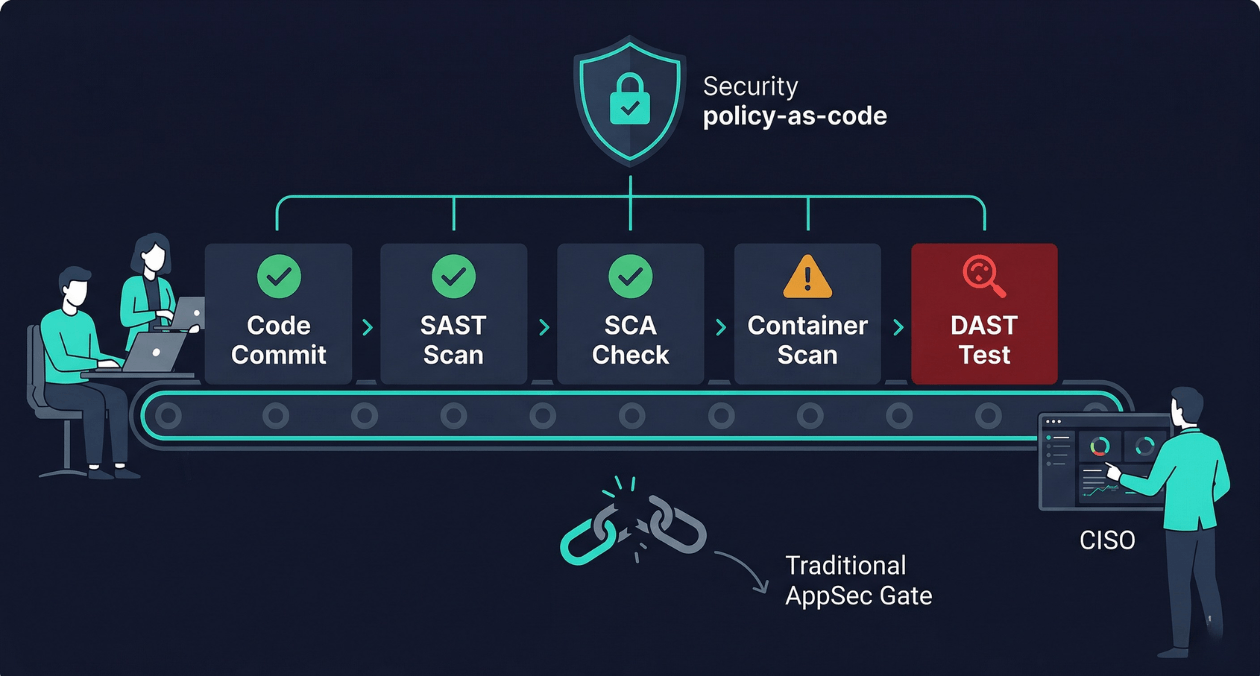
There is a particular kind of friction that security teams and engineering teams share without ever quite resolving. Engineering wants to ship fast. Security wants to ship safely. When security operates as a gate at the end of the release process, it becomes a bottleneck: a queue of features waiting for a penetration tester’s review, a checklist that slows the release train, and a relationship where security is experienced as the team that says no. When a vulnerability eventually reaches production, the conversation about who is responsible is never comfortable for anyone.
Security as code is the practice of treating security controls, policies, and checks the same way software is treated: defined in version-controlled files, tested automatically, applied consistently across every environment, and owned by the engineering team rather than outsourced to a security review process that runs outside the development cycle. The shift-left security model that underpins this practice is not a new idea, but the tooling has matured to the point where a well-designed DevSecOps pipeline can catch the majority of application security issues before a single line of code reaches production, without meaningfully impacting deployment frequency or developer velocity.
This guide covers what a production-ready security as code implementation looks like at each stage of the CI/CD pipeline, which tools are worth the integration cost, how to make security findings actionable for developers rather than overwhelming, and how to build a policy framework that enforces security standards without requiring a security engineer to review every pull request.
Why the Traditional AppSec Model Breaks at Delivery Speed
The traditional application security model was designed for release cycles measured in months. A development team would build a feature over several weeks, hand it to a QA team, and eventually schedule a penetration test before a major release. The penetration tester would find issues, file a batch of vulnerability reports, and the development team would prioritise fixes in the next sprint. The feedback loop was slow but tolerable when releases were infrequent.
That model collapses when teams deploy multiple times per day. A penetration test that takes two weeks to schedule and execute cannot sit in the critical path of a CI/CD pipeline that runs in 20 minutes. A security review process that requires a dedicated security engineer to approve every pull request does not scale when a team of 30 engineers is merging dozens of PRs daily. And vulnerabilities that are found weeks after the code was written are significantly more expensive to fix than vulnerabilities caught at the moment the vulnerable code is introduced.
IBM’s research on the cost of fixing security defects at different stages of the software development lifecycle consistently shows that a defect caught during development costs orders of magnitude less to fix than the same defect caught in production. The OWASP DevSecOps Guideline documents this problem comprehensively and provides a framework for thinking about where security controls belong in the pipeline. The shift-left principle is simple: move security checks as far left toward the developer as possible, because every stage rightward multiplies the cost and complexity of remediation.
The Four Layers of a Security as Code Pipeline
A complete security as code implementation operates across four distinct layers of the CI/CD pipeline. Each layer catches a different class of vulnerability and uses different tooling. Understanding what each layer does and does not catch prevents the common mistake of believing that one tool is sufficient.
| Pipeline Layer | What It Checks |
|---|---|
| SAST (Static Application Security Testing) | Analyses source code for security vulnerabilities without executing it: injection flaws, hardcoded credentials, insecure function calls, unsafe deserialization |
| SCA (Software Composition Analysis) | Scans third-party dependencies for known CVEs, licence compliance issues, and outdated packages with published exploits |
| Container and IaC scanning | Checks container images for vulnerable OS packages and application layers; checks Terraform, Helm, and Kubernetes manifests for security misconfigurations |
| DAST (Dynamic Application Security Testing) | Tests the running application by sending crafted requests to discover runtime vulnerabilities: authentication bypass, injection through API endpoints, broken access control |
No single layer catches everything. SAST produces false positives at a high rate and cannot find vulnerabilities that only manifest at runtime. DAST finds runtime vulnerabilities but requires a running environment and covers a smaller surface area than static analysis. SCA is highly accurate for known CVEs but cannot detect vulnerabilities in your own code. Container scanning catches OS-level vulnerabilities that SAST entirely misses. A production-ready DevSecOps pipeline uses all four layers, with each running at the appropriate stage in the pipeline to balance feedback speed against coverage depth.
SAST: Catching Vulnerabilities at the Code Level
Static analysis tools parse your source code into an abstract syntax tree or a control flow graph and then apply a set of rules to identify patterns associated with security vulnerabilities. A rule might look for string concatenation into a SQL query, identify places where user input flows into a shell command execution function, or flag the use of a cryptographic primitive that is known to be weak.
Choosing a SAST Tool for Your Stack
SAST tool quality varies significantly by language. A tool with excellent coverage for Java may have shallow rules for Python or Go. When evaluating SAST options, the most important question is not which tool has the longest list of supported languages but which tool has the deepest, most accurate rules for your primary languages with the lowest false positive rate.
| Tool | Strengths | Consideration |
|---|---|---|
| Semgrep | Highly customisable rule sets, fast, supports many languages, open-source community rules | Rule quality depends on which rule sets you enable; custom rules require investment |
| Checkmarx | Deep taint analysis, enterprise support, broad language coverage | Higher cost; significant tuning required to reduce false positive rate |
| Snyk Code | Good developer experience, IDE plugin available, tight SCA integration | Better for teams already using Snyk for SCA; rule depth varies by language |
| CodeQL | Exceptionally deep analysis for supported languages, free for open-source | Slower than Semgrep; requires query writing for custom checks |
Managing SAST Noise Without Disabling Useful Rules
The most common reason SAST implementations fail is that the tool is turned on with default settings, produces hundreds of findings on the first run including many false positives, overwhelms the team, and gets quietly disabled or ignored. The effective approach is to start with a narrow, high-confidence rule set and expand coverage incrementally as the team builds the habit of responding to findings.
Baseline mode is the right starting configuration. In baseline mode, the tool scans the entire existing codebase, generates a snapshot of all current findings, and treats those findings as the accepted baseline. Future scans only report findings that are new relative to the baseline. This means engineers only see security issues introduced by their own changes, not a backlog of historical debt, which makes the findings immediately actionable and the feedback loop tight.
SCA: Owning Your Dependency Attack Surface
The majority of application code in any modern service is not code your team wrote. It is third-party libraries, frameworks, and transitive dependencies that your direct dependencies pull in. The Log4Shell vulnerability in 2021 and the XZ Utils backdoor in 2024 demonstrated that the dependency graph of a typical application is a substantial attack surface that is entirely outside the reach of SAST tools focused on first-party code.
Software Composition Analysis tools maintain databases of known vulnerabilities in open-source packages, indexed by package name and version. When your manifest files (package.json, requirements.txt, go.mod, pom.xml) are scanned, the tool compares every dependency version against the vulnerability database and reports any matches with associated CVE identifiers, severity scores, and available fix versions.
Dependency Scanning in the Pull Request Workflow
SCA is most effective when it runs on every pull request and blocks merges that introduce new critical or high-severity vulnerabilities without an explicit review. Tools like Dependabot and Renovate go further by automatically opening pull requests that update vulnerable dependencies to patched versions, which shifts the workload from manually tracking CVEs to reviewing and merging automated upgrade PRs.
Transitive dependency vulnerabilities require extra handling. A direct dependency that is itself safe may pull in a transitive dependency that is vulnerable. Most modern SCA tools resolve the full dependency tree and report transitive vulnerabilities, but the fix is less straightforward because you cannot simply update the transitive dependency directly. You either update the direct dependency to a version that no longer pulls in the vulnerable transitive dependency, or you override the transitive dependency version explicitly in your manifest if your package manager supports it.
Need help designing a DevSecOps pipeline that your developers will actually use?
Container and Infrastructure as Code Scanning
Shifting security left does not stop at application code. The container images that package your application and the infrastructure manifests that deploy it are equally part of your security posture and equally amenable to automated scanning.
Container Image Scanning
A container image is a layered filesystem built on top of a base OS image. Each layer may contain OS packages, language runtimes, and application binaries that carry their own vulnerability histories. Container scanning tools inspect every layer of an image and report OS-level CVEs and application-layer vulnerabilities that exist in the image at build time.
The key integration point is the image build step in your CI pipeline. The scanner runs immediately after the image is built and before it is pushed to the registry. A critical vulnerability in the base image fails the build, which forces the team to update the base image before the new image can be deployed. Pinning base images to specific digest references rather than mutable tags like ‘latest’ or ‘alpine:3’ is the prerequisite practice: you cannot scan for vulnerabilities reliably if the base image you are scanning against can change between pipeline runs.
Infrastructure as Code Security
Terraform configurations, Kubernetes manifests, and Helm charts contain security decisions: whether a storage bucket is publicly accessible, whether a pod runs with a privileged security context, whether a security group allows ingress from 0.0.0.0/0. These decisions are codified in files that live in version control and that can be scanned automatically before they are applied to any environment.
| IaC Scanning Tool | Primary Use Case |
|---|---|
| Checkov | Broad IaC coverage including Terraform, Kubernetes, Helm, CloudFormation, ARM templates |
| tfsec / Trivy (IaC mode) | Terraform-focused scanning with good AWS, Azure, GCP provider coverage |
| kube-score | Kubernetes manifest scoring with security and reliability checks |
| OPA / Conftest | Custom policy-as-code for any structured config format using Rego rules |
OPA (Open Policy Agent) with Conftest deserves special attention because it enables policy-as-code at a level that purpose-built scanners cannot reach. Instead of being limited to the vulnerability rules that a vendor defines, you write your own policies in Rego that encode your organisation’s specific security requirements. A policy that prohibits any Kubernetes deployment from running as root is two lines of Rego. A policy that requires all S3 buckets to have versioning enabled is equally concise. These policies run in CI against every manifest change and in Kubernetes admission control against every applied resource.
DAST: Testing the Running Application
Dynamic Application Security Testing operates against a running instance of your application, sending HTTP requests designed to probe for vulnerabilities that only manifest at runtime. An API endpoint that is vulnerable to SQL injection looks perfectly clean in static analysis if the vulnerable code path involves multiple function calls across different files. DAST finds it by sending a crafted payload and observing whether the response indicates the payload was interpreted as a SQL command.
DAST belongs later in the pipeline than SAST and SCA because it requires a deployed environment. The practical integration point is the staging or pre-production environment that is deployed automatically as part of the pipeline before a production promotion. Running a DAST scan against staging as a pipeline gate catches runtime vulnerabilities before they reach production without requiring a running production environment as the scan target.
Targeted vs Crawl-Based DAST
Traditional DAST tools work by crawling an application, discovering all reachable URLs, and then fuzzing each endpoint with a library of attack payloads. This approach works reasonably well for server-rendered web applications where a crawler can discover pages by following links. It works poorly for API-first applications where endpoints are not discoverable by crawling because they require specific request structures and authentication tokens.
API-aware DAST tools address this by accepting an OpenAPI specification or Postman collection as input and using it to understand the structure of every endpoint, the expected request format, and the authentication requirements. Tools like OWASP ZAP with its OpenAPI addon and Burp Suite Enterprise support this API-first scanning mode and are the appropriate choices for modern backend services that expose REST or GraphQL APIs rather than server-rendered HTML.
Secrets Detection: The Vulnerability That Ships in Plain Sight
One of the most consistently underestimated categories of application security failure is secrets leakage: API keys, database credentials, private keys, and authentication tokens committed directly into source code or configuration files and then pushed to a repository. Once a secret is committed to a repository, it exists in the Git history permanently even after it is removed from the current codebase, unless the history is explicitly rewritten.
Secrets detection tools scan every commit for patterns that match known secret formats: AWS access keys, GitHub personal access tokens, private key headers, connection strings with embedded passwords. Running this scan as a pre-commit hook catches secrets before they reach the remote repository. Running it again in CI catches any secrets that bypassed the pre-commit hook.
| Tool | Integration Point |
|---|---|
| Gitleaks | Pre-commit hook and CI pipeline; open-source with custom rule support |
| TruffleHog | Git history scanning and CI integration; detects secrets in historical commits |
| GitHub Secret Scanning | Automatic scanning of all commits to GitHub repositories; built-in for public repos, available for private with GitHub Advanced Security |
| detect-secrets (Yelp) | Pre-commit hook with a baseline file for suppressing known false positives |
The most important operational practice around secrets detection is not the scanning itself but what happens when a secret is found. Every engineering team needs a documented secret rotation runbook: which credentials need to be rotated immediately, how to rotate each type, how to verify that the compromised credential has been revoked and that no unauthorised access occurred during the window of exposure. Without a runbook, secret detection findings create panic rather than a controlled response.
Need help designing a DevSecOps pipeline that your developers will actually use?
Policy as Code: Enforcing Security Standards Systematically
Security policy as code means encoding your organisation’s security requirements in machine-readable, version-controlled files that can be automatically evaluated against infrastructure configurations, deployment manifests, and API requests. The goal is to replace security review processes that depend on a human manually checking whether a configuration meets a standard with automated checks that run consistently on every change.
OPA is the dominant policy engine for this use case in Kubernetes-native environments. It operates in two modes that serve different purposes in a security as code architecture. In CI mode, OPA with Conftest evaluates Terraform plans and Kubernetes manifests before they are applied. In admission control mode, OPA as a Kubernetes admission webhook evaluates every resource creation and modification request in real time and rejects any that violate defined policies.
Writing Policies That Engineers Accept
Security policies written without developer input tend to produce two outcomes: either they are too restrictive and generate constant violations that engineers learn to suppress or work around, or they are too permissive to catch meaningful issues. The most effective policy sets are written collaboratively between security and engineering, starting with the controls that matter most for your specific risk profile and expanding from there.
Every policy that blocks a pipeline or rejects a resource request should include a human-readable message that explains what was violated and how to fix it. A policy violation message that says ‘Policy check failed’ creates a support ticket. A policy violation message that says ‘Container is running as root. Set securityContext.runAsNonRoot: true in your pod spec’ resolves the issue without involving the security team.
Making Security Findings Actionable for Developers
The gap between a security tool finding a vulnerability and a developer understanding how to fix it is where most DevSecOps implementations lose momentum. Security tooling that produces raw CVE identifiers and CVSS scores without context is not useful to a developer who is not a security specialist. The presentation of findings matters as much as the accuracy of the findings themselves.
Several practices close this gap effectively.
- Severity thresholds in CI: Only fail the build on critical and high-severity findings. Medium and low findings are reported but do not block deployment. This prevents alert fatigue from low-priority issues while ensuring that genuinely dangerous vulnerabilities are addressed before they ship.
- Fix guidance inline: Tools that provide remediation advice alongside the finding, including the specific version of a dependency that fixes a CVE or the specific code change that resolves a SAST finding, reduce the cognitive load on developers significantly. Semgrep’s autofix feature and Snyk’s fix PRs are examples of this pattern taken to its most useful conclusion.
- Developer-owned security backlogs: Security findings that cannot be fixed immediately should flow into the team’s own backlog as tracked work items, not into a separate security ticket system that engineering never reviews. When security debt lives in the same place as feature work, it gets prioritised alongside feature work rather than deprioritised as someone else’s problem.
- Security champions: Embedding a security champion within each engineering team, a developer with additional security training who acts as a liaison with the security function, improves the quality of security-related code review and reduces the response time to security findings. The champion does not replace the security team; they extend its reach into the day-to-day development process.
Building the Pipeline: A Practical Stage-by-Stage Layout
A production-ready security as code pipeline for a typical microservices application integrates the layers described above in the sequence that maximises feedback speed for developers while maintaining comprehensive coverage before production promotion.
- Pre-commit hooks run secrets detection and optionally a fast SAST subset on the files being committed. These run locally on the developer’s machine in under five seconds and catch the most obvious issues before they ever reach the remote repository.
- Pull request CI runs the full SAST scan in baseline mode, SCA dependency analysis, and IaC scanning against any changed Terraform or Kubernetes manifests. Findings are reported as inline PR comments where the tooling supports it. Critical and high SAST findings block merge. New critical CVEs in dependencies block merge.
- Post-merge CI runs container image scanning against the newly built image. A critical OS-level CVE in the image fails the pipeline before the image is pushed to the production registry.
- Pre-production deployment triggers a DAST scan against the staging environment after deployment. The DAST scan runs targeted checks against the API surface defined in the OpenAPI specification. Critical findings block the production promotion.
- Ongoing monitoring runs scheduled SCA scans against all production images to catch newly published CVEs for dependencies that were clean at build time. New critical CVEs trigger an alert that creates a remediation ticket.
This sequence ensures that the feedback loop for the most common vulnerability classes is measured in minutes, not days, while keeping the total pipeline addition to a manageable overhead. Askan’s DevOps and cloud engineering services design and implement this full pipeline integration as part of broader CI/CD modernisation engagements, including tool selection, policy configuration, and developer enablement to ensure that the security controls are used correctly rather than bypassed.
Measuring the Effectiveness of Your DevSecOps Programme
Security as code is not a one-time implementation. It requires ongoing measurement to verify that it is catching vulnerabilities effectively, that developers are responding to findings in acceptable timeframes, and that the pipeline is not drifting from the security standards it was designed to enforce.
| Metric | What It Measures |
|---|---|
| Mean time to remediate (MTTR) critical findings | How quickly the team responds to high-severity security findings; target under 24 hours for critical CVEs |
| Escape rate | Percentage of vulnerabilities that reach production despite pipeline checks; a consistently non-zero rate indicates a gap in coverage |
| False positive rate per tool | How many findings are invalid; a high false positive rate indicates the tool needs tuning or the rule set needs pruning |
| Dependency freshness | Percentage of direct dependencies within one major version of the latest release; indicates whether the team is maintaining dependency hygiene |
Reviewing these metrics in a monthly security review attended by both engineering leads and the security function creates the shared accountability that makes a DevSecOps programme sustainable. Without measurement, security as code implementations drift: the tools run but findings are ignored, pipelines are bypassed for urgent releases, and the theoretical coverage does not reflect the actual security posture of the system.
Most popular pages

Feature Flags in Production: Progressive Delivery Without the Risk
The deploy button used to mean something definitive. You shipped code, users got the new version, and if something broke you scrambled to roll...
-
Service Mesh Architecture: When Istio and Linkerd Are Worth the Complexity
There is a specific moment in the growth of a microservices platform when the operational questions start arriving faster than the answers. How do...
-
WebAssembly in 2026: Performance, Use Cases and When to Use It in Production
WebAssembly has been in the conversation for nearly a decade, but 2026 is the year more engineering teams are moving it from experimental to...
Feature Flags in Production: Progressive Delivery Without the Risk
The deploy button used to mean something definitive. You shipped code, users got the new version, and if something broke you scrambled to roll...
Service Mesh Architecture: When Istio and Linkerd Are Worth the Complexity
There is a specific moment in the growth of a microservices platform when the operational questions start arriving faster than the answers. How do...
WebAssembly in 2026: Performance, Use Cases and When to Use It in Production
WebAssembly has been in the conversation for nearly a decade, but 2026 is the year more engineering teams are moving it from experimental to...